Games
How to play Ludo with no internet, on separate phones
You do not need internet to play Ludo on separate phones — you need the phones to talk to each other. Ludo Online links 2–4 Android and iOS devices directly over Bluetooth Low Energy, with no router, no account and no system pairing. Below are the steps, the two settings that trip most groups up, and what the mode gives up in exchange. One of those steps has to happen before you leave the house.
Which “offline” do you actually need?
“Offline” means three different things on a store listing, and only one of them helps four people holding four phones. We took the term apart in offline games for kids; for a board game it comes down to this:
- One device, passed around. Hotseat. No radio involved, so it works anywhere, but everybody has to lean over the same screen.
- Several devices on one network. No internet needed, but a router is, which rules out a train.
- Device to device. The phones find each other over their own radios and need neither a router nor a connection.
Ludo Online has the first and the third. Local Match is hotseat for 2–4 people on one device, and Play nearby is device to device over Bluetooth. Its two online modes need a real connection: a private room with a six-character code, and a public Quick Match. The dice there are generated and every turn validated by server functions, not by the phone in your hand.
How do four phones start a match with no connection?
Six steps. The first one needs a connection, so it happens before you go; the other five work with no connection at all.
- Install Ludo Online on every phone while you still have a connection. Put the same version on all of them; a phone on an older build may not join.
- Turn Bluetooth on everywhere. If you are in airplane mode, Bluetooth went off with everything else — switch it back on by hand.
- One person opens Play nearby and taps Create game. That phone is the host: it owns the dice, the turn order and the board. Bluetooth access is requested at this point, after an in-app explanation of what it is for, rather than on first launch.
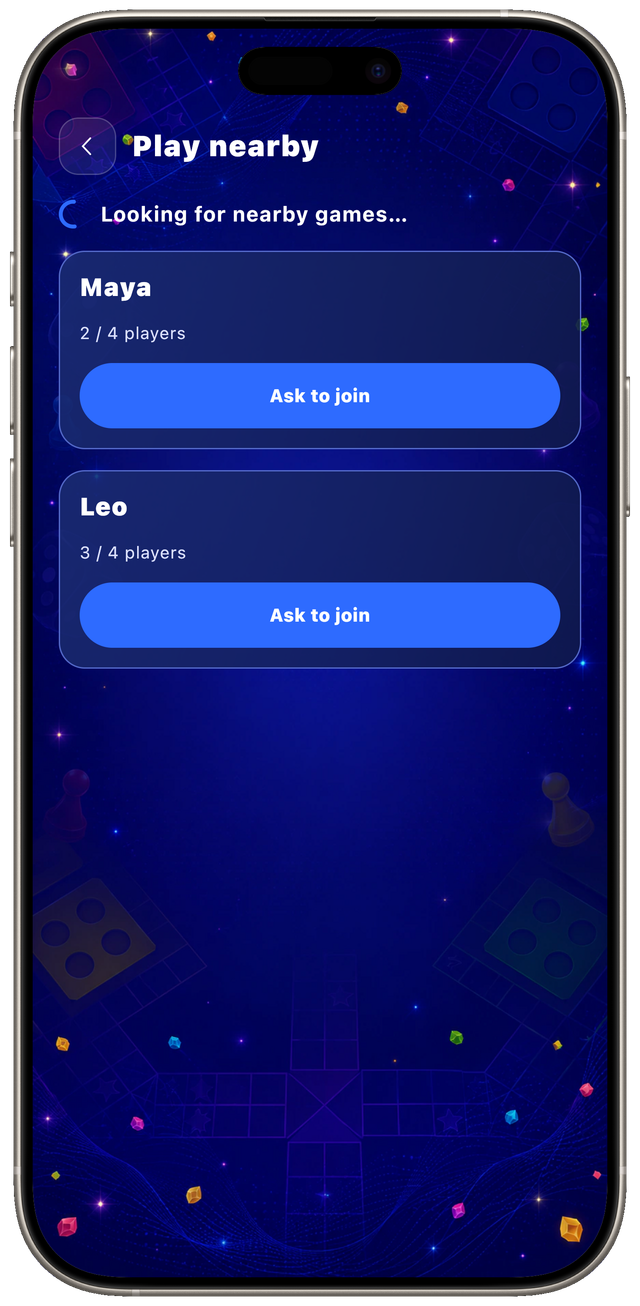
- Everyone else opens Play nearby, taps Find games, then Ask to join on the host’s row. No pairing, no PIN, no code to read out loud.
- The host approves each person and gives them a seat.
- The host starts the match with 2, 3 or 4 seats filled.
A phone that cannot host still gets Find games, with Create game disabled, so an older handset in the group is not a problem as long as somebody else creates the room.
Step 4 — Ask to join
Step 5 — the host gives a seat
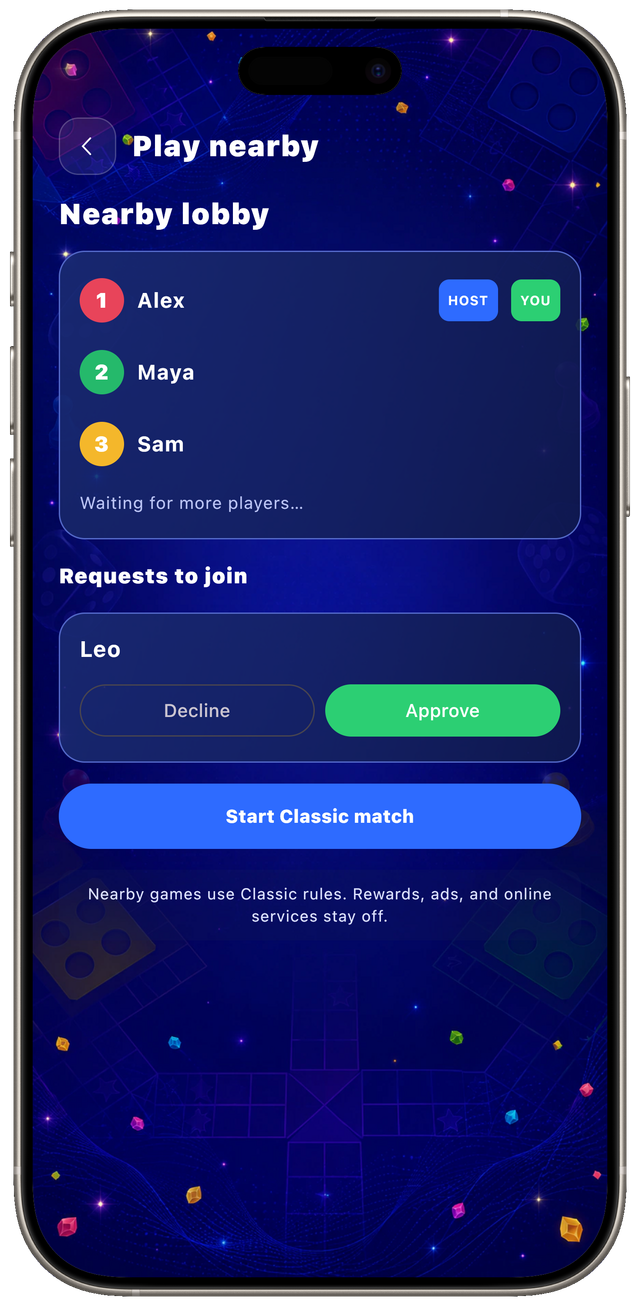
Underneath, the host owns the game the way a server would. Guests send intents — roll, move this token — and get full, numbered snapshots of the board back. That is the online mode’s trust boundary moved onto whichever phone opened the lobby, and it is what stops a guest from choosing its own dice.
The protocol and the session logic are covered by unit tests, 269 of them across the app. The radio is not, because Bluetooth cannot be exercised in a phone emulator. So the device matrix is a separate physical checklist: two, three and four phones, both mixed-platform directions, at least one Android 8–11 handset. It is tracked apart from the build, because a build that passes is not the same as a radio that passes.
What should you check before you leave?
Four things. Three of them are done once; the second has to be repeated every time you turn airplane mode on.
- The app has to be on every phone already. No signal means no store, and on a plane you find that out too late to fix it.
- Airplane mode turns Bluetooth off. Enable airplane mode first, then re-enable Bluetooth by hand, on each phone. This is the most common reason a group cannot see each other.
- Keep the phones close. Our own device runs put every phone within two metres. That is the distance the mode is verified at rather than a hard limit; Bluetooth Low Energy reaches further, but we have not tested it further.
- Everyone should be on the same version. Update before you go, not after three people are already waiting in a lobby.
What do you give up by playing nearby?
Four limits, and they are worth knowing before four people sit down.
Play nearby is Classic rules only, and foreground only — leaving the app drops you out of the match. There is no host migration, so the host is a single point of failure. Nearby matches are not autosaved either, unlike solo and hotseat games, which resume where you left them.
The rules themselves are the same in every mode. Four tokens each, starred safe cells, capture, exact entry to home, another roll after a six or a capture, and a burned turn after three sixes in a row. Blockades are not part of this version. So a group can start a match online and finish the next one over Bluetooth without relearning anything.
If you expected online play to work and it did not, the fault is usually upstream of the game — the decision tree for that is in is it my Wi-Fi or the internet.
What does it cost, and what does it show you?
Ludo Online is free, and free has a price that should be visible before you install. It shows an AdMob banner in fixed slots: the setup screen, the Play Nearby screen, the match and the results screen. The only ad you choose yourself is the optional Lucky Six in solo play, capped at three per match and switched off entirely in online and nearby games.
What it does not do is the part worth naming, because the category is known for it: no entry stakes, no coin tables, no purchasable dice, and no interstitial between rounds. A dice game with money on the table is a different product with the same board. The arithmetic behind that trade is in what a puzzle game subscription costs.
Why do so many people play Ludo?
Because the whole game is one die and four tokens, and the rules are already common knowledge across a large part of the world. Ludo is the English simplification of pachisi, an Indian cross-and-circle game. It was sold as Ludo in England in 1896, under British patent 14636, and the name is the Latin ludo — “I play”. The cube-shaped die and the dice cup are the English part; the board and the race home are not.
The scale of the demand is easiest to read off the category leader. Its studio’s own announcements put it at 500 million downloads in December 2020, 800 million in 2022 and one billion in 2024, across more than 200 countries.
It also happens to suit a phone. A turn takes a single tap, so a match costs nothing to abandon mid-way and pick up an hour later. The state is tiny — sixteen token positions and one die — so it travels over any transport you can find. Being turn-based is the part that matters for Bluetooth: a slow link delays a move instead of ruining it, where the same delay would wreck a real-time game. How slow is too slow is a question about ping, jitter and packet loss.
Ludo Online is free, on both stores, in 16 in-app languages, and its Play nearby mode needs no account and no connection. If a trip is coming, put it on every phone in the group before you go — that is the one step that needs a signal. Its page lists both platforms and what it shows you, and the rest of the shelf is on the Games page.
Frequently asked questions
- Can you play Ludo on two phones with no internet?
- Yes. Ludo Online's Play nearby mode connects 2–4 Android or iOS devices directly over Bluetooth Low Energy. It needs no router, no account, no system Bluetooth pairing and no PIN: one device taps Create game, and the others find it with Find games and Ask to join.
- Does Play nearby work in airplane mode?
- Yes, once you switch Bluetooth back on. Airplane mode turns Bluetooth off along with the other radios, so enable airplane mode first and then re-enable Bluetooth by hand on every phone. Nothing else has to be on: no Wi-Fi, no mobile data, no account.
- Does Play nearby work between an iPhone and an Android phone?
- Yes, in both directions. An iPhone can host Android guests and an Android phone can host iPhone guests, because both sides speak one protocol over their own Bluetooth stack. Those directions are checked on physical phones rather than in an emulator, which has no radio to test.
- What happens if the host leaves a nearby match?
- A disconnected player gets 30 seconds to return to the same seat and the same board. If the host stays gone for the whole window, everyone is told the match ended instead of being handed a fabricated win. Nearby matches are not autosaved, so there is nothing to resume later.
- Does Ludo Online show ads?
- Yes. It is free and shows an AdMob banner in fixed slots: the setup screen, the Play nearby screen, the match itself and the results screen. The one ad you choose yourself is the optional Lucky Six in solo play, capped at three per match and unavailable in online and nearby games.