Games
How to win at minesweeper, and when you must guess
You win minesweeper by opening every cell that is not a mine — flagging is bookkeeping, not the win condition. In Minesweeper on iOS and Android, the last mines are flagged for you the moment the final safe cell opens. The counting that gets you there is two rules, applied over and over along the edge of what you have already opened. Below are those rules, where the first tap should go, and what to do when neither rule applies.
What actually counts as a win?
Every non-mine cell revealed. That is the whole condition, and nothing about your flags enters into it.
What the game does at the end shows it plainly. Minesweeper settles the win the moment the last safe cell opens, then flags every mine still hidden, drops the counter to zero, and waits 600 milliseconds before showing the dialog with your time. A player who flagged nothing wins the same game as a player who flagged all 99.
So flags are for you, not for the game. They mark a cell you have already worked out, and they drive the mine counter in the top bar, which starts at the mine count for the difficulty and drops by one per flag. Two limits apply: you cannot place more flags than there are mines, and you cannot flag anything before your first reveal. Both attempts are refused with a sound and a red pulse on the counter rather than a silent no-op.
Which two rules clear most of a board?
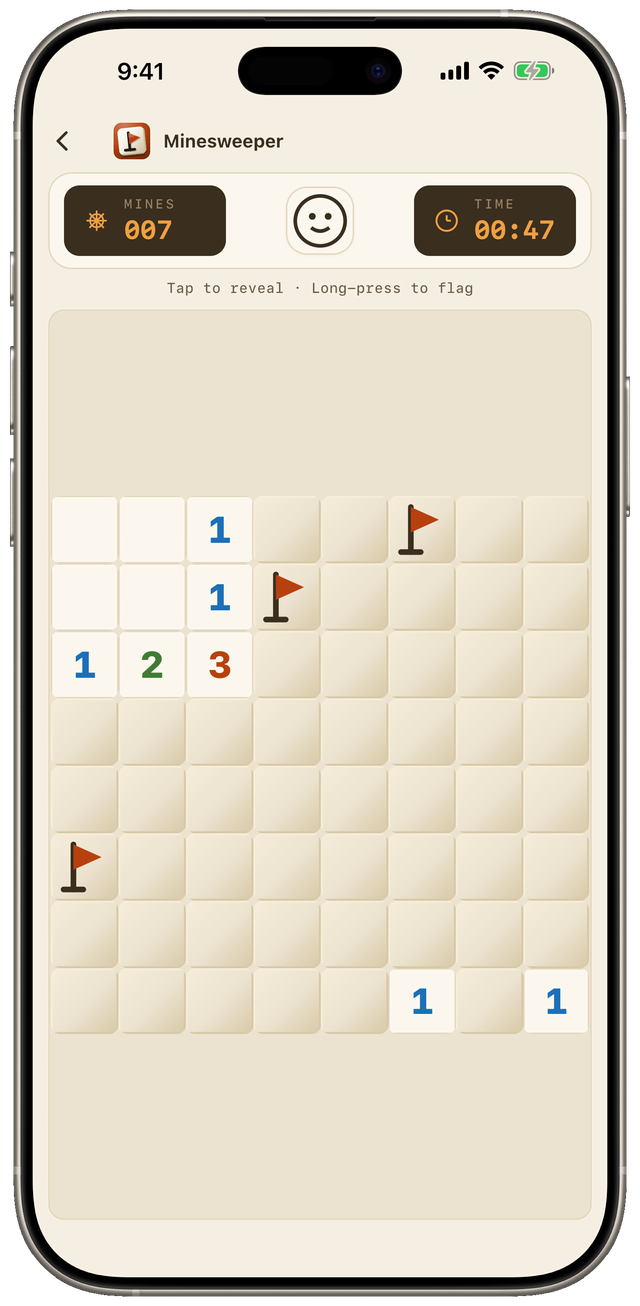
A number on a revealed cell is the count of mines in the eight cells touching it. Everything below is that one fact, read in two directions.
- The number is satisfied. If a cell shows 2 and two of its neighbours are already flagged, every other neighbour is safe. Open all of them.
- The number is saturated. If a cell shows 3 and it has exactly three neighbours still hidden, all three are mines. Flag them.
Neither rule is worth much once. Their value is that each one changes the count around the cells nearby, which often makes a neighbour decidable that was not decidable a second ago. So work the boundary of the opened region in passes rather than pursuing one cell, and re-read a number after any of its neighbours resolves.
The board you read
The board the app finishes
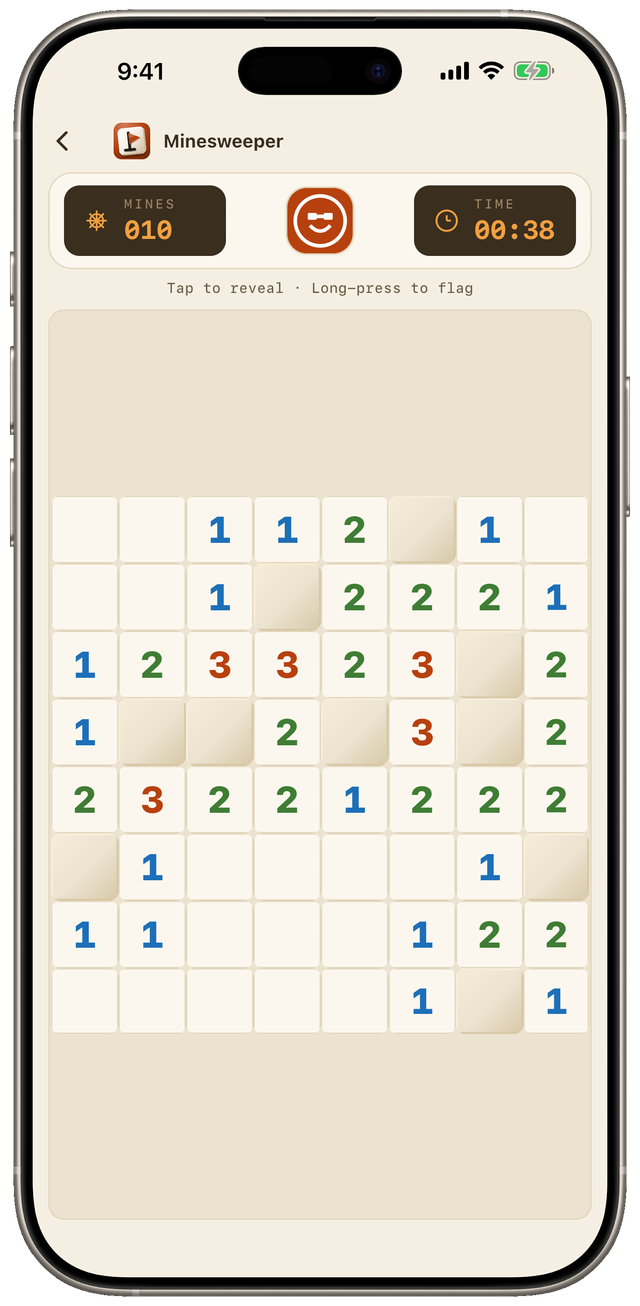
There is a third rule for the endgame, and it depends on your flags being correct. When the mine counter reaches zero, every cell still hidden is safe — but only because each flag you placed was right. One misplaced flag turns that into a losing click, which is the argument for flagging what you have proved rather than what you suspect.
One desktop technique is missing here, and guides lean on it: there is no chording, the double-click on a satisfied number that opens its remaining neighbours at once. What Settings offers instead is a choice of control scheme — tap to reveal with a 300-millisecond long-press to flag, or tap to flag with a double-tap to reveal. The second is the forgiving one, because a misfire places a flag you can undo instead of opening a cell you cannot.
Where should the first tap go?
Anywhere, in Minesweeper — the first tap cannot be a mine, because the mines are placed after it and never in the cell you tapped or the eight around it. That is a property of how the board is built rather than luck, and it changes the standard opening advice completely.
Most guides tell you to open in a corner, because a corner has three neighbours instead of eight and is therefore likelier to be empty. That is sound for versions that place the mines before your first click, and beside the point here, where the opener is empty either way.
The argument for the middle is the size of the pocket. A middle tap keeps nine cells clear of mines and a corner tap keeps four, so the middle opens more boundary to reason from. That is an argument from how placement works, not a measured win rate — we have not run one.
What do you do when there is no safe move?
You work out which cell is least likely to kill you, and you open it. Positions exist where no amount of reading settles the next move, and that is the part most strategy pages leave out.
Richard Kaye’s paper Minesweeper is NP-complete, in The Mathematical Intelligencer in 2000, showed that deciding whether a partially revealed board is even consistent — whether any arrangement of mines fits every number on it — is NP-complete. That is about the general problem, not a promise that your board needs a guess. Why yours might is simpler: the generator guarantees the safe opener and nothing else, so nothing ever checks for a guess-free solution.
Two numbers then decide the move. The local one comes from a single clue: a 1 with two hidden neighbours makes each of them a mine half the time. The global one is your remaining mines over your remaining hidden cells, which is what a cell far from every number is worth. Take whichever is lower, and take it early — a forced guess with sixty cells closed costs less than the same guess with six.
This is the honest difference between minesweeper and a puzzle that can promise you a way through. In mahjong solitaire the deal can be built so a solution exists, and we build ours that way; a minesweeper grid offers no such guarantee. The habit that does transfer is the one from block puzzle strategy: prefer the move that keeps later moves available.
When did minesweeper appear?
The grid-with-adjacent-mine-counts idea reached home computers in 1983. Wikipedia’s article on Mined-Out dates it to that year, on the ZX Spectrum, written by Ian Andrew and published by Quicksilva; a detector told you how many invisible mines were beside you, though it counted only the four orthogonal directions rather than all eight.
Microsoft’s version is younger and far better distributed. Per Wikipedia’s article on Microsoft Minesweeper, Curt Johnson and Robert Donner’s game shipped in Microsoft Entertainment Pack 1 in 1990, and was added to the standard Windows 3.1 install in 1992, where it replaced Reversi. It stayed in the default install until Windows 8 in 2012.
Why did it stay popular?
Because two decades of being pre-installed put it in front of everyone, and the rules held up on their own afterwards.
The bundling was not sentimental. In 99% Invisible’s account of the Windows games, Solitaire taught drag-and-drop. Minesweeper taught the two mouse buttons and cursor precision, at a time when most people had never used a mouse. That explains how it reached every desk. It does not explain why people still open it, fourteen years after Windows stopped shipping it by default.
Three properties do. The rules fit in a sentence. A session runs as long as the grid you chose, so you decide the length when you pick a difficulty. And nothing has to be remembered between sessions.
Minesweeper on iOS and Android keeps all three on a phone. The board is the whole interface and a turn is one tap. Gameplay needs no connection: in the terms taken apart in offline games for kids it is the fully bundled kind, and the only things that reach the network are its AdMob ads and its Firebase analytics and crash reporting. Its three difficulties are the classic ones — 8×8 with 10 mines, 16×16 with 40, and 16×30 with 99 in portrait — and each keeps its own table of your five best times.
What does it cost, and what does it show you?
Minesweeper on iOS and Android is free on both stores, with nothing to buy — and the price of free should be visible before you install. Minesweeper shows an AdMob banner in a reserved strip at the bottom of every screen, and a full-screen ad after every third game you lose. The first and second losses after installing are silent, and there is currently no way to remove either placement with a purchase.
What it does not have is the part worth naming, because the category is known for it: no cooldown timer between games, no lives, no coins, and no daily streak to break. Nothing waits for you and nothing charges you to skip the wait. The arithmetic behind that trade is in what a puzzle game subscription costs.
Minesweeper is free on iOS and Android, works with no connection, and asks for no account, so the two rules above are ten minutes of practice away. Its page lists both platforms and what it shows you before you install anything, and the rest of the shelf is on the Games page.
Frequently asked questions
- Do you have to flag mines to win at minesweeper?
- No. A game is won when every cell that is not a mine has been opened, and flags are a way of keeping track rather than part of the win condition. In Minesweeper on iOS and Android, opening the last safe cell flags every remaining mine for you and the mine counter drops to zero before the win dialog appears.
- Can your first click in minesweeper be a mine?
- Not in Minesweeper on iOS and Android. Mines are not placed until you make the first reveal, and they are then placed everywhere except the cell you tapped and its eight neighbours. That means the first tap is safe wherever you put it, and it always opens into a region with no adjacent mines.
- Can every minesweeper board be solved without guessing?
- No, and Minesweeper on iOS and Android does not promise it. The board generator guarantees a safe first tap and nothing beyond that, so a position can appear where two cells are equally consistent with every number on the board. At that point the honest move is the arithmetic: pick the cell with the lowest chance of holding a mine.
- Is it better to start in a corner or in the middle?
- In Minesweeper on iOS and Android the middle is the better argument. A corner tap keeps four cells clear of mines and a middle tap keeps nine, because the exclusion covers the tapped cell and its neighbours. The corner advice you see elsewhere is about older versions that place the mines before your first click.
- Does Minesweeper on iOS and Android show ads?
- Yes. Minesweeper is free, and it shows an AdMob banner in a reserved strip at the bottom of every screen plus a full-screen ad after every third lost game. The first and second losses after installing are silent. There is currently no way to buy the ads out, and the app card says so before you install.
